Click Here for the Best Deals on Diamond Rings

zoom

Hover

Full Screen

Wins – Mac Windows Manager | Lifetime Access

$13.00

Last updated on August 6, 2026 2:33 pm Details

Description

Mac users love their devices for their smooth and intuitive interface, but window management on macOS can be inefficient and frustrating. That is why DealFuel brings to you –
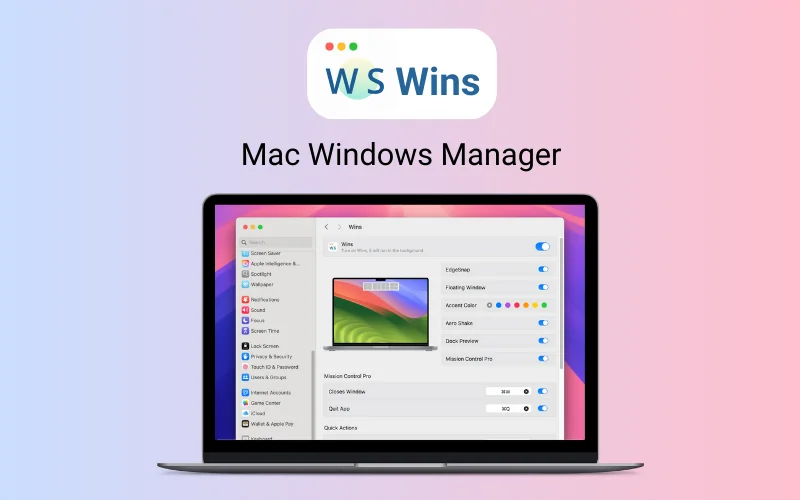
Wins – Mac Windows Manager
Wins is a system-level window management software designed exclusively for macOS.
It offers intuitive and practical window organization features that allows users to arrange, hide, and navigate between windows effortlessly.
Wins enhances Mac’s window management by integrating essential features like Aero Shake, Dock Window Preview, and Quick Split Window.
With system-level integration, users can customize keyboard shortcuts and move windows between displays with ease.
Features of Wins – Mac Windows Manager:
Dock Window Preview:
Hover over an app in the Dock to preview all open windows, making switching between applications faster and more efficient.
Aero Shake:
Shake a window to instantly hide all other open windows, helping you focus on the task at hand.
Mission Control Pro:
Enhance macOS’s native Mission Control by allowing users to close windows directly from the view using shortcut keys.
Hide All/Other Windows:
Hide all windows or all but the active window to declutter your screen.
System-Level Integration:
Wins ensures a seamless and native macOS experience without the need for extra menus or docks.
Keyboard Shortcuts:
Customize shortcut keys for quick window organization and management.
Floating Split Window:
Drag a window to access floating split view, making multitasking even more intuitive.
Move Windows Between Displays:
Easily shift windows between multiple screens to optimize your workflow.
Quick Split Window:
Snap windows to screen edges for instant side-by-side viewing.
Dark Mode Support:
Fully compatible with macOS’s Dark Mode, providing a sleek and modern appearance.
Low System Resource Usage:
Consumes less than 30MB RAM and under 10% CPU usage, ensuring it runs smoothly in the background.
Native Apple Silicon Support:
Optimized for both Intel and Apple Silicon Macs, ensuring the best performance across all devices.
System Requirements:
macOS 10.15 or later
Wins works on macOS High Sierra (10.13) or higher, Compatible with the latest macOS Sequoia.
Sneak Peek Into Wins:
Dock Window Feature
Hide Other Window
Move Display
Efficiency
Hide Windows Feature
Floating Split Window
Dashboard Settings
Customer Testimonials:
“It’s a cool design for mac users especially
developers and art designers!”
– Leitures from China
“Easily one of the best of its kind !”
– Thaledric from Germany
Deal Terms:
How to download/activate this product?
After completing your purchase, you will receive an instructions document. Follow the instructions in this document to redeem the coupon code and get access to this product.
What is the validity of the license key/coupon code? (Within how many days the coupon code must be redeemed?)
The coupon code must be redeemed within 30 days from the date of purchase.
Do you get Lifetime Access to this deal?
Yes, this deal gives you lifetime access to Wins – Window Manager For Mac.
Lifetime means the lifetime of the product.
We try to get great products with longevity for our customers, but products do get acquired, or sometimes the products go bankrupt. Many of these products are startup companies, giving us a great deal for our customers. But in case of an unfortunate situation where the product does not last long, there is not much DealFuel can do about it.
Are Lifetime Updates available for this product?
Yes, Lifetime updates are available for this product.
Is support available for this product?
Yes, support is available for this product.
For support, contact –  support@wins.cool.
Is this deal for new users only?
No, this deal is available for both new and existing users of Wins.
How many users can use the license key/coupon code?
1 coupon code can be used for 1 user/account.
Are the coupon codes stackable?
Yes, the coupon codes are stackable.
Can this product be accessed on all devices?
Yes, Wins is accessible on all devices provided the devices have good internet connection.

Rate this product

Reviews

There are no reviews yet.

Be the first to review “Wins – Mac Windows Manager | Lifetime Access”

This site uses Akismet to reduce spam. Learn how your comment data is processed.

Privacy Policy Terms and Conditions Disclosure Contact Us
We use cookies to personalise content and ads, to provide social media features and to analyse our traffic. We also share information about your use of our site with our social media, advertising and analytics partners. View more
Cookies settings
Accept
Decline
Privacy & Cookie policy
Privacy & Cookies policy
Cookie nameActive

Who we are

Our website address is: http://bestdealztoday.com.

Comments

When visitors leave comments on the site we collect the data shown in the comments form, and also the visitor’s IP address and browser user agent string to help spam detection.An anonymized string created from your email address (also called a hash) may be provided to the Gravatar service to see if you are using it. The Gravatar service privacy policy is available here: https://automattic.com/privacy/. After approval of your comment, your profile picture is visible to the public in the context of your comment.

Media

If you upload images to the website, you should avoid uploading images with embedded location data (EXIF GPS) included. Visitors to the website can download and extract any location data from images on the website.

Cookies

If you leave a comment on our site you may opt-in to saving your name, email address and website in cookies. These are for your convenience so that you do not have to fill in your details again when you leave another comment. These cookies will last for one year.If you visit our login page, we will set a temporary cookie to determine if your browser accepts cookies. This cookie contains no personal data and is discarded when you close your browser.When you log in, we will also set up several cookies to save your login information and your screen display choices. Login cookies last for two days, and screen options cookies last for a year. If you select "Remember Me", your login will persist for two weeks. If you log out of your account, the login cookies will be removed.If you edit or publish an article, an additional cookie will be saved in your browser. This cookie includes no personal data and simply indicates the post ID of the article you just edited. It expires after 1 day.

Embedded content from other websites

Articles on this site may include embedded content (e.g. videos, images, articles, etc.). Embedded content from other websites behaves in the exact same way as if the visitor has visited the other website.These websites may collect data about you, use cookies, embed additional third-party tracking, and monitor your interaction with that embedded content, including tracking your interaction with the embedded content if you have an account and are logged in to that website.

Who we share your data with

If you request a password reset, your IP address will be included in the reset email.

How long we retain your data

If you leave a comment, the comment and its metadata are retained indefinitely. This is so we can recognize and approve any follow-up comments automatically instead of holding them in a moderation queue.For users that register on our website (if any), we also store the personal information they provide in their user profile. All users can see, edit, or delete their personal information at any time (except they cannot change their username). Website administrators can also see and edit that information.

What rights you have over your data

If you have an account on this site, or have left comments, you can request to receive an exported file of the personal data we hold about you, including any data you have provided to us. You can also request that we erase any personal data we hold about you. This does not include any data we are obliged to keep for administrative, legal, or security purposes.

Where your data is sent

Visitor comments may be checked through an automated spam detection service.
Save settings
Cookies settings