Description
This post contains affiliate links.
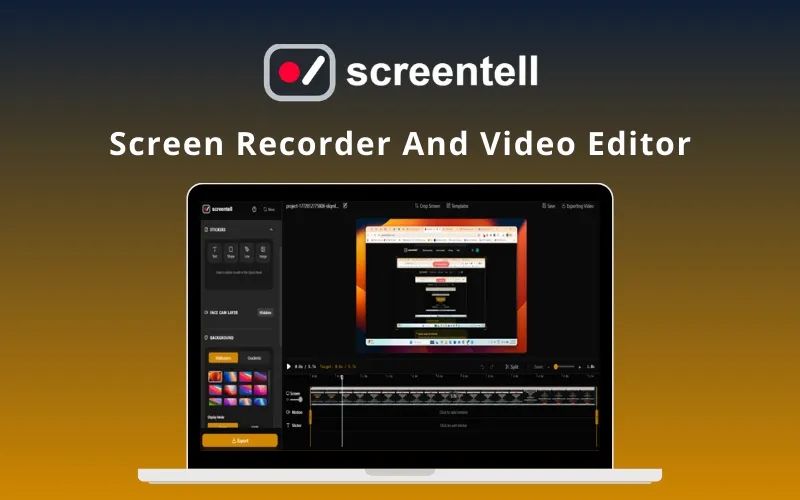
Screentell – Cinematic screen recording tool featuring cinematic 3D effects (Screen Studio Alternative)
Screentell is an in-browser all-in-one cinematic screen recording tool designed for creators, indie makers, and SaaS founders.
Product Preview Images :
Product Introduction YouTube Video Link :
Product Features :
Feature 1 :
Title – High-Quality Dual Recording
Description (max 1200 characters) –
Dual Capture: Record your screen and face camera simultaneously.
Face camera as a separate layer: Freely resize, reshape (circle, square, rect), and reposition your camera feed with keyframe animation. Or you can hide your camera bubble after recording.
System Audio and Microphone: Capture high-fidelity system sound along with your microphone.
No Installation: Runs entirely in your browser—no heavy software to download.
Feature 2 :
Title – Focus Motion (2D Zoom / Cinematic 3D Transform)
Description (max 1200 characters) –
Focus Zoom: Guide your audience’s eye with smooth 2D zooms and pans
Cinematic 3D Transform: Break the flat screen. Add depth to your recordings with 3D rotation, scaling, and skewing
Feature 3 :
Title – Rich Annotation Stickers
Description (max 1200 characters) –
Enhance your video with visual cues using Stickers. Screentell provides a variety of shapes and tools to highlight information or add text.
Stickers: Add arrows, speech bubbles, and shapes to highlight important details.
Customization: Full control over colors, borders, roundness, and shadows.
Images: Upload your own images to overlay on your video.
Feature 4 :
Title – Beautiful Layouts and Background settings
Description (max 1200 characters) –
Elevate your videos to studio quality with easy background & frame customization
Background:
Solid color — match your brand
Beautiful preset gradients — modern & sleek
Preset wallpaper images — instant professional backdrop
Padding — Drag the slider to shrink the recording and create breathing room around it. Perfect for placing captions, stickers, or annotations outside the main content without feeling cramped.
Video Frame styling:
Roundness — soften corners for a friendlier, modern appearance
Elevation (shadow) — add realistic drop shadow with adjustable intensity & spread to give depth and make your recording pop off the background
This gives videos a clean, high-end cinematic feel in just a few clicks.
Feature 5 :
Title – Video Cropping
Description (max 1200 characters) –
Remove unwanted parts of your screen recording to focus on what matters.
This is especially useful for hiding:
Browser tabs and address bars
System taskbars or menu bars
Sensitive information (notifications, personal data)
Distracting UI elements
Feature 6 :
Title – Cutting & Speed Control
Description (max 1200 characters) –
Effortlessly edit out mistakes, pauses, and dead air for cleaner, faster videos
Trim the ends
Hover over the timeline and drag the Start or End Handle inward to quickly cut unwanted sections from the beginning or end.
Split, delete & speed control
Split clips anywhere on the timeline to isolate sections.
Right-click any segment → Delete to instantly remove filler, errors, or slow parts.
Adjust speed: Accelerate lengthy processes (e.g., installs, loading screens) or slow down key moments for emphasis and clarity.
Perfect for turning raw recordings into polished, professional content in minutes.
Product Specifications :
Platform: Screentell is a cross-platform solution that runs on all modern desktop browsers, including Google Chrome, Microsoft Edge, Brave, and Arc. Note: For the optimal experience, we recommend using a Chromium-based browser.
License Type: Single-user license
Commercial Use: Yes
Updates Included: Yes (lifetime updates for purchased tier)
Export Quality: High-resolution video export
Core Features:
Cinematic 3D camera animations
Sticker-style annotations
Smooth zoom & cursor effects
Fast editing workflow
Use Cases: Product demos, tutorials, launch videos, social media content
Product Target Audience :
SaaS Companies: Creating product demos, onboarding tutorials, and feature walkthroughs.
Educators and Course Creators: Developing engaging online courses and instructional videos.
Marketers: Producing promotional content, explainer videos, and social media clips.
Support Teams: Generating clear and concise troubleshooting guides.
Social Media Creators: Youtuber creating videos from screen recording.
Customer Testimonials :
The video immediately sold me on why this could be incredibly useful for digital product shots so I’m fully on board with this. Can’t wait to try it; @jamespopstar
This will be perfect for my YouTube channel! Do you plan on adding templates we can use? It was hard to set everything up myself. It would be nice if we upload our video and it will automatically add all the effects. @kenneth_fong3
The “record → edit → export in one browser tab” + cinematic 3D camera moves is a clever differentiator vs the usual zoom/pan. @ryan_thill
This is an impressive 3D effect—truly remarkable! Great job on achieving such a stunning visual. At last, we have an outstanding screen recording that showcases creativity and skill. @gfazioli
The cinematic camera effects genuinely make demos more engaging and professional. u/Opening_Lynx_6331
Nice buddy! I just bought the Pro subscription 😀 @anukarop
this is genuinely impressive web tech like this still feels magical @lmkeev
Features of Plans :
Deal Terms :
How to activate/download this product?
Users receive a license key and activate link via email. open the link and enter the key to activate full features. Lifetime updates included.
What is the validity of the license key/coupon code?
The license key will grant lifetime access to the purchased tier. Coupon codes will remain valid during the campaign period only.
Are the coupon codes stackable?
No, coupon codes are not stackable. Each purchase grants access to a single license tier only.
How many users can use the license key/coupon code?
Each license key is valid for one user only (single-user license). Team or multi-user access requires separate licenses.
Is Lifetime Access available for this product?
Yes
Are Updates available for this product?
Yes
How to receive these updates?
All updates are delivered automatically within the website.
Is this deal for new users only?
No, for all user without LTD permissions.
Can this product be accessed on all devices?
Yes, The product is in-browser, it’s a cross-platform solution
Is FREE Support available for this product?
Yes
How to contact support?
email: support@screentell.com

Reviews
There are no reviews yet.