Description
This post contains affiliate links.
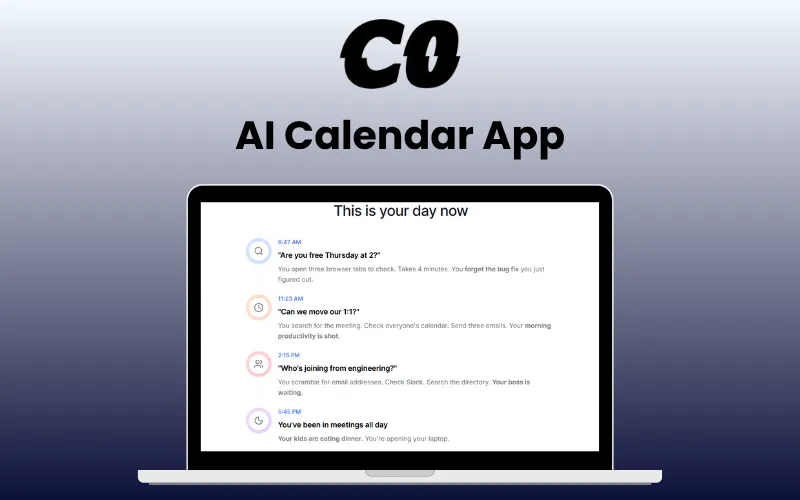
Scheduling your meetings just got easy —just as easy as chatting with a friend—no browser, no clicks—just one quick command, with –
Calendar0 – AI Calendar App
Calendar0 is a smart, AI-powered calendar app designed to help you schedule meetings and manage your time faster and easier than ever. It allows you to –
SCHEDULE meetings with simple natural-language commands.
SYNC with Google Calendar and automatically detect scheduling conflicts.
CHECK attendee availability before booking meetings.
SAVE up to 20 minutes daily on calendar management.
VIEW your calendar instantly from your system tray or menubar.
CONVERT names to emails automatically with smart contact resolution.
JOIN meetings instantly with one-click notifications.
MANAGE your entire day using simple chat commands.
With cross-platform compatibility, a lightweight footprint, and end-to-end encryption, Calendar0 is built for professionals who value speed, simplicity, and data security.
Introduction To CalendarO – AI Calendar App:
How Does CalendarO Works in 3 Easy Steps:
Install & Launch: Double-click the downloaded file. Calendar0 appears in your menu bar/system tray.
Connect Calendar: Sign in and sync your calendar (your data stays on your device).
Try the Magic: Click the calendar icon, then the chat tab. Type “what’s my day look like?” or “schedule lunch with Sarah tomorrow at noon”
Features Of Calendar0 – AI Calendar App:
Instant Access:
Lives right in your system tray or menubar.
View your schedule instantly without opening a browser.
AI-Powered Assistant:
Manage your calendar using simple, natural commands.
Use commands like “Schedule lunch for tomorrow at 1 pm” or “Show today’s schedule.”
Google Calendar Sync:
Seamlessly syncs with Google Calendar in real time.
Create, edit, delete, or view events with full control.
Supports multiple calendars effortlessly.
Smart Contact Resolution:
Automatically converts names to emails using Google Workspace.
Checks attendee availability before booking.
One-Click Meetings:
Receive smart notifications with instant access to meetings.
Join your next event with a single click.
Fast & Lightweight:
Launches in under 2 seconds with minimal memory use.
Consumes less than 150MB of RAM.
Designed for speed and efficiency.
Keyboard-First Design:
Navigate your calendar with quick keyboard shortcuts.
Switch between day and week views seamlessly.
Privacy-Focused:
Encrypted token storage keeps your data safe.
Secure authentication powered by Supabase.
Cross-Platform Support:
Works smoothly on both Windows and macOS.
Compact 360×620px window for a clean interface.
System Requirements:
OS: macOS 10.15+, Windows 10+
Storage: ~50MB for app + space for code history
Memory: 256MB RAM minimum
Dependencies: Google Calendar
Integration Roadmap:
Google Calendar
Microsoft Outlook – Coming Soon
Apple Calendar – Coming Soon
Preview Of Calendar0:
Today’s Preview
C0 Assistant
Keyboard Shortcuts
Settings
Shortcuts
Some important questions you might have…
Will IT freak out about this?
No. Calendar0 is a desktop app, not a browser extension. It uses standard Google OAuth (the same secure login you use everywhere). Your calendar stays in Google’s servers. Calendar0 just displays it better. IT actually prefers this to sketchy browser plugins.
Does this work with my work calendar?
Yes. Calendar0 works with Google Workspace (your company Gmail) and personal Google accounts. See all your calendars in one view without switching accounts.
Will people know I’m using this?
No. When you schedule meetings, they just get a normal Google Calendar invite. Nobody knows you typed ‘lunch with sarah tomorrow’ and let AI do the rest. It looks exactly like you did it the old way.
What exactly can I type?
Anything you’d say out loud: ‘Am I free at 2 pm?’ ‘move my 1:1 to next week’ ‘schedule standup with engineering Monday 10 am’ ‘find 2 hours for deep work’. Just type what you’re thinking.
What if it screws up and schedules something wrong?
CalendarO shows you what it’s about to do before sending invites. You confirm or cancel. Plus, it’s just creating normal Google Calendar events you can edit anytime. Same as if you made a mistake yourself.
Is this deal exclusive to new users?
No, this deal is available for both new and existing users of Calendar0.
Is this actually secure?
Yes. We use the same security as Google Calendar itself – OAuth2, encrypted connections, no password storage. Your tokens are encrypted on your device using your operating system’s secure storage. We can’t see your calendar data even if we wanted to.
Deal Terms:
How to download/activate this product?
After completing your purchase, you will receive an instructions document. Follow the instructions in this document to redeem the coupon code and get access to this product.
What is the validity of the license key/coupon code? (Within how many days must the coupon code be redeemed?)
The coupon code must be redeemed within 30 days of the purchase date.
Is a Lifetime Subscription available for this product?
Yes, a lifetime subscription* is available with this deal for Calendar0.
*LIFETIME MEANS LIFETIME OF THE PRODUCT.
We try to get great products with longevity for our customers, but products do get acquired, or sometimes the products go bankrupt. Many of these products are from startup companies, giving us a great deal for our customers. But in case of an unfortunate situation where the product does not last long, there is not much DealFuel can do about it.
Are updates available for this product?
Yes, free and automatic lifetime updates are available for this deal.
Is support available for this product?
Yes, free support is available for lifetime with this product.
For support, contact – support@calendar0.app.
Is this deal exclusive to new users?
No, this deal is available for both new and existing users of Calendar0.
How many users can use the license key/coupon code?
One coupon code can be used for one user/account.
Are the coupon codes stackable?
No, the coupon codes are not stackable.
Can this product be accessed on all devices?
No, Calendar0 is accessible only on Windows 10+ and macOS 10.15 Desktops.



1 review for Calendar0 – AI Calendar App | Lifetime Access
There are no reviews yet.