Description
This post contains affiliate links.
Many professionals and organizations struggle with creating detailed, professional-grade diagrams efficiently. That is why DealFuel brings to you –
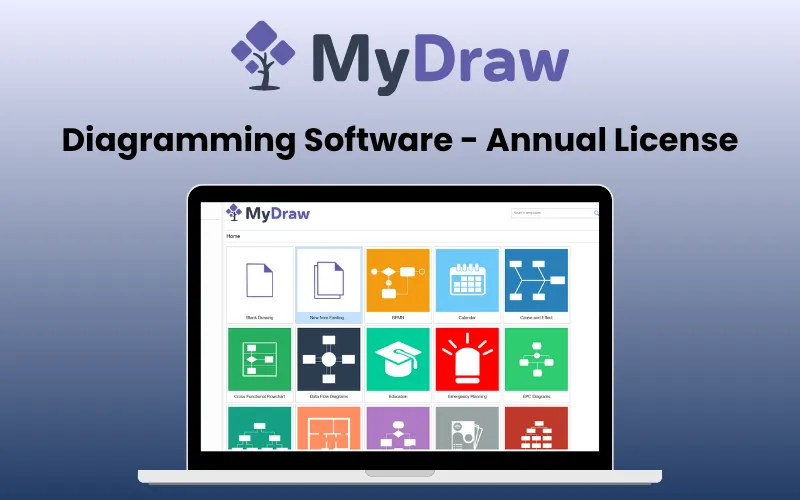
MyDraw – Diagramming Software
MyDraw is an advanced diagramming software that helps you create a wide variety of diagrams such as flowcharts, organizational charts, mind maps, family trees, network diagrams, and more.
It combines a familiar, Office-inspired interface with powerful features such as –
Vector drawing
Automated layouts
Rich text formatting
And Multi-format compatibility.
Whether you need a simple drawing tool or a full-fledged Visio replacement, MyDraw delivers quality and value at an affordable price.
Introduction To MyDraw –
Features of MyDraw – Diagramming Software:
Friendly User Interface:
Intuitive, Office-inspired design for quick onboarding.
Supports multiple languages, including English, Spanish, and Chinese.
Shapes and Connectors:
Use smart shapes with control points for adjustments.
Automatically rerouting connectors for clean layouts.
Barcode Integration:
Add 1D and 2D barcodes to diagrams easily.
Ideal for catalogs, envelopes, and other printed materials.
Automatic Diagram Layouts:
Quickly arrange large diagrams with auto layouts.
Fine-tune settings for customized layouts.
Powerful Vector Drawing Tools:
Create precise shapes like lines, curves, and polygons.
Perform advanced geometry operations like union and subtraction.
Rich Text Formatting:
Advanced text formatting with bullet styles and tables.
Integrated spell check with Open Office dictionaries.
Visio Compatibility:
Import, edit, and save Visio files seamlessly.
Leverage existing Visio stencils for efficient design.
Ready-to-Use Templates:
Choose from 500+ templates for quick setup.
Edit and customize templates to suit your needs.
Predefined Shape Libraries:
Access 50,000+ shapes across diverse topics.
Request custom shape libraries for unique needs.
Printing and Exporting:
Generate high-quality prints and PDFs with ease.
Export diagrams to formats like SVG, EMF, BMP, and PNG.
Image Generation:
Create high-resolution raster or vector images.
Customize bounds and settings for export.
Data Import:
Import charts from Excel and ESRI maps.
Edit family tree data in GEDCOM format.
Diagram Templates:
Start with prebuilt templates for various diagram types.
Modify templates to save time and increase productivity.
How to create a family tree using MyDraw?
Start with a Reference Point : Drag and drop the corresponding shape (Male/Female) from the library, then enter the person’s details.
Add Immediate Family Members : Use the context menu to add parents, siblings, and other immediate relatives.
Expand to Extended Family
Format and Enhance the Diagram : Add photos and adjust connectors, include a legend, and finalize the layout for clarity and visual appeal.
How to draw a heart diagram using MyDraw?
Create the shape using Basic Shapes and Connectors or import a design as a vector/raster image.
Add the custom shape to a new library : Drag and drop the shape into the library.
Save the library or export the diagram in formats like PDF, SVG, EMF, VSDX, or raster images.
How to draw an organizational chart?
Open MyDraw and the Basic Shapes Library.
Add the Head of the Organization
Add Divisions/Departments, and arrange shapes for divisions using the Connector Tool.
Add Employee Positions
Customize Connectors and Shapes
Use the Design Tab for themes and finalize the chart.
System Requirements Of MyDraw – Diagramming Software:
Windows:
OS: Microsoft Windows XP/Vista/7/8/8.1/10 (32-bit & 64-bit)
.NET Framework 3.5 or higher
RAM: 1 GB
HDD: 600 MB free disk space
Monitor: display resolution of at least 720p (1280 x 720).
MyDraw will work best at a resolution of WXGA (1366 x 768) or higher.
Macintosh:
OS: macOS X 10.9 or higher
RAM: 1 GB
HDD: 600 MB free disk space
Monitor: display resolution of at least 720p (1280 x 720).
MyDraw will work best at a resolution of WXGA (1366 x 768) or higher.
MyDraw for Web:
Runs on Blazor – a Microsoft technology built on top of WebAssembly (a W3C standard).
Generally all modern browsers (Chrome, Edge, Firefox, Safari), support WebAssembly, and hence Blazor.
The only browser that does not support WebAssembly is IE.
Customer Testimonials:
“Perfect diagrams, How easily all networks and cloud networks diagrams can be done”
Silvia M.Junior Cybersecurity Consultant
“-Very affordable price, for companies or individual use
-Importing and exporting Visio files is very easy
-Possibility to use standard Visio templates
_Suport for MS office”
Alessandro S.Alessandro Spiriticchio
“I’ve tried other diagramming software but after trying out MyDraw I guess I’m sticking to this one.
I suppose the frustated designer in my is always in search of tools to make life easier and also makes things look good.
MyDraw I consider is like a vector drawing program with a lot of CAD things in mind (child, parents, locking) that make diagramming very cool.
GUIDES! there are guides inside the program which makes layouts a zinch.”
Verified User in Museums and Institutions
Deal Terms:
How to download/activate this product?
After completing your purchase, you will receive an instructions document. Follow the instructions in this document to get access to MyDraw.
What is the validity of the activation license key/code? (Within how many days must the code be redeemed?)
The coupon code must be redeemed within 30 days from the date of purchase.
Is a Lifetime Subscription available for this product?
No, an Annual Subscription is available for this product with this deal.
Are Annual Updates available for this product?
Yes, updates are available for free during the subscription period.
Is support available for this product?
Yes, support is available for this product.
For support, contact – support@mydraw.com.
How many users can use the license key/coupon code?
1 coupon code can be used by 1 user/account.
Are the coupon codes stackable?
No, the coupon codes are not stackable.
Is this deal for new users only?
No, this deal is available for both new and existing users of MyDraw – Diagramming Software.



1 review for MyDraw – Diagramming Software | Annual Access
There are no reviews yet.