Description
This post contains affiliate links.
If you are in the product designing sector, you want your designs to be top-notch and be made quickly. Designing isn’t just about throwing and tossing the elements together and creating an end product. It is more about bringing the product to life. To make it happen, we bring you –
Mockplus RP – Product Design Software
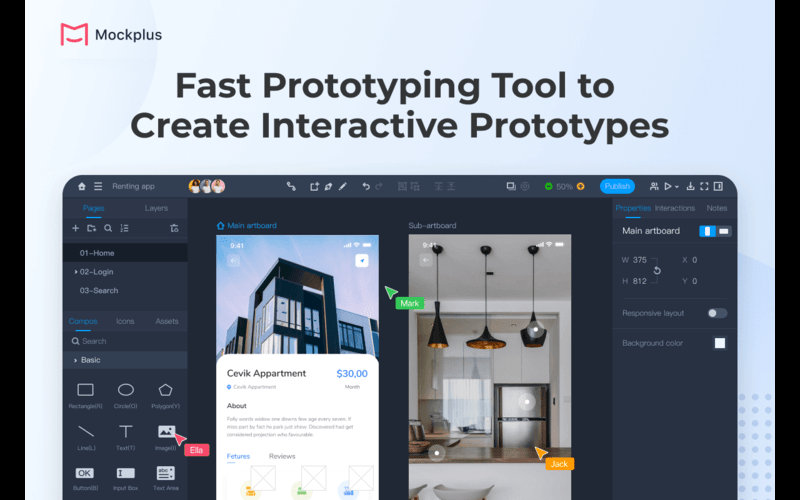
Mockplus RP is a fast online prototyping tool. It helps you create from sketches, diagrams, wireframes to hi-fi and interactive prototypes with drag-and-drop, and also test and then iterate them early on any device.
With thousands of pre-made icons, templates, UI components for nearly every design theme and style, Mockplus helps you to visualize your imagination quickly without starting from scratch. Its vector drawing tools give you power to personalize your prototype down to the very last detail making it a great product designing tool.
Mockplus is great for rapid prototyping, all thanks to its simple, drag-and-drop user interface. Even a beginner can jump right in and start creating immediately.
Introduction To Mockplus RP – App Prototyping Tool:
Highlights Of This Product Design Software-
3000 + preset UI elements and templates:
Kickstart your project with ready-to-use icons, components, UI patterns, kits and templates. No need to start from scratch.
Evergrowing widget libraries:
A set of third-party UI widget libraries for Web, iOS, Android, Material Design, Ant design, Bootstrap and the like are available with far more component variants and styles to present your ideas in the quest way. Far more libraries are still on the way…
Lifelike interactions and gestures:
Animate your web and app prototypes with lifelike interactions, animations, transitions and mobile gestures.
Vector editing made easy:
Customize any prototype detail in your own style quickly by using the vector drawing tools and boolean operations.
Save and reuse assets:
Save components, layouts and other design assets once, and reuse across pages and prototypes. No repetitive work anymore.
Diagram as fast as you need:
Use pre-made shapes, symbols and other elements to quickly map out any UI/UX flowcharts with drag-and-drop.
Share and feedback:
Share prototypes via a link to gather valuable feedback directly from teammates, stakeholders, clients, and even real users. It also generates custom share links for different purposes.
Preview and test on real devices:
Instantly preview and test out your prototype ideas right from your web and mobile devices, with a link.
Undisturbed personal workspace:
There is an undisturbed personal workspace for you to fully prototype and validate your ideas.
Side-by-side notes:
Add notes to deliver requirements, measurements and other details right beside the workspace.
Perfect integration with Axure:
Import your Axure files for further co-editing, collaboration and handoff.
Extensive export options:
Export layers or prototypes to PDF, images, or fully functional and interactive HTML demos. While exporting the source file of your designs, you may choose to export the inner asset libraries as well for better sharing and backup.
How To Create A Wireframe In Mockplus –
Features Of This Web App Prototype Tool –
Customer Reviews For MockPlus RP:
“Great rapid prototyping tool with helpful plugins.”
Awesome tool for UX designers, hi-fi prototypes, asset management and coding all in one cloud-based app. The plugins are great for handing off to other members on the team and those working in Mockplus as well.
Sean L
“Great product for for designers!”
I like how it covers everything a design team might need to create the perfect web and mobile app design, from low-frequency wireframes, prototyping, and collaboration, to handoff to developers.
Alice Z.
“Great platform for designers.”
Mockplus is a useful, one-stop product design platform for designers and teams. It covers everything that a design team may need to create a perfect web and mobile app design, all the way from low-fi wireframing, prototyping and collaborating to developer handoff. Also, due to its simple and easy interface and functionalities, individuals and teams with different design experiences can work on the same page without chaos.
Pooja J.
Previous
Next
Deal Terms –
How to download this product?
After completing your purchase, you will receive an instructions document. Follow the instructions in this document to redeem the coupon code and activate the subscription.
What is the validity of the license key/coupon code?
The coupon code must be redeemed within 30 days from the date of purchase.
Is Lifetime Access available for this product?
Yes, Lifetime Access and Annual access are available for this product.
Are Lifetime Updates available for this product?
Yes, lifetime updates are available for this product.
Is this deal for new users only?
No, This deal is for both new and existing users of Mockplus.
How many users can use the license key/coupon code?
1 Coupon Code can be used for 1 pro plan.
Can this product be accessed on all devices?
Yes, this product can be accessed on all devices.
Is lifetime support available for this product?
Yes, FREE support is available for Lifetime.
For support contact –support@mockplusapp.com

1 review for Mockplus RP – Product Designing Platform | Annual & Perpetual
There are no reviews yet.