Description
This post contains affiliate links.
Editing and vectorizing images is a tough task, but not if you have access to an online image vectorizer!
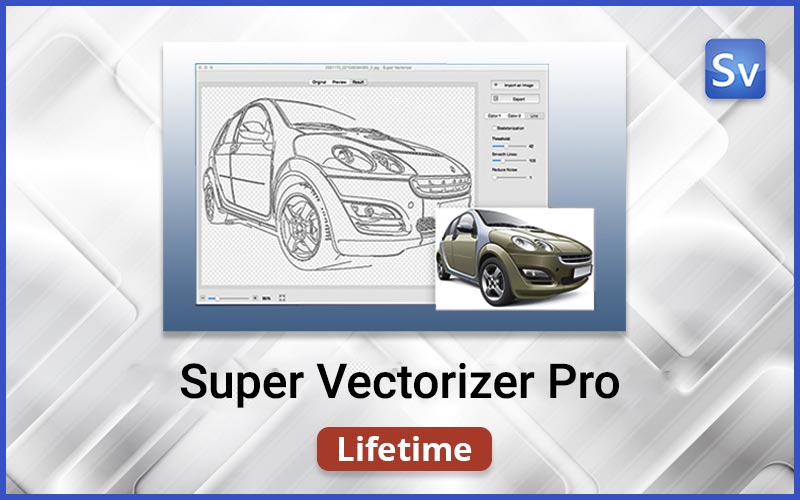
Super Vectorizer Pro – Image Vectorizer
Super Vectorizer Pro is a professional one-click vector tracing software that converts bitmap images like JPEG, GIF, etc., to clean, scalable vector graphics.
Here’s what Super Vectorizer can do in a single click:
Image vectorization in 2 color modes
Convert drawings to vectors
Convert raster to vector graphics
Image segmentation to get cleaner & concise vector graphics
Save
Save
Save
Save
Save
Save
How To Convert Images To Vectors With Super Vectorizer Pro:
Features Of This Image Vectorizer Tool
Super Vectorizer Pro – raster-to-vector software simplifies the process of converting images into vector graphics with its innovative algorithm, ensuring natural colour and compatibility with Illustrator, Corel, and other platforms.
Automatic Vectorization –
Super vectorizer pro offers fully automatic vectorization.
Supports multiple colors –
Super vectorizer supports up to 64 colors.
Image Segmentation
Supre vectorizer enables precise tracing of clean line borders, avoiding region overlapping.
Image to Vector conversion –
Convert images to edge, color, gray color, skeletonization, or line with conversion options.
Two color modes –
Including a unique mode with an image segmentation polymerization algorithm.
Line-tracing optimization –
Super Vectorizer Pro – raster to vector program offers line-tracing optimization with a new engine tailored to user needs.
Image Skeletonization –
Provides skeletonization feature for converting pencil drawings into vector graphics.
Enhanced pre-processing –
Image Vectorizer Pro offers smoothing function for simplifying complex images.
Multiple File output –
Super vectorizer provides vector graphics output in Ai, SVG, DXF, and PDF formats.
Zoom Options –
Provides zoom-in and zoom-out options for convenient result inspection.
Automatic Image Tracing –
Enables automatic tracing of images across 70+ formats, including JPG, BMP, PNG, GIF, PDF, PSD, and more.
All these features make Super Vectorizer Pro the best program to vectorize an image for Mac & Windows
Preview of Super Vectorizer Pro – Raster to Vector Software
FAQs:
How to Quickly Vectorize Images?
Buy the Super Vectorizer Pro Lifetime deal from DealFuel and redeem the code to access Super Vectorizer Pro, follow the instructions below to vectorize the images –
Step 1: Import the Image to Super Vectorizer
-Open Super Vectorizer on Mac or Windows.
-Import image files using three methods: drag and drop, click “Import,” or use the File menu.
Step 2: Vectorizing Image
-The vectorizing workflow begins automatically upon importing.
-Review the vectorized image result.
-Export the result to Ai, SVG, DXF, or PDF on Mac by clicking “Export.”
Step 3: Reopening for Further Editing
-After vectorizing, reopen the vector image for additional editing.
How to Convert PNG to SVG, JPG to SVG Vector?
Step 1: Open Super Vectorizer on Mac or Windows.
Drag PNG or JPG files to the preview pane for conversion.
Step 2: Checking Conversion Result
Super Vectorizer automatically converts PNG to SVG or JPG to SVG.
Check the progress in the information bar.
Step 3: Easily modify the SVG vector graphic after conversion.
Adjust color numbers, enhance image edges, and smooth radius.
Step 4: Export the SVG vector image file to your device.
Deal Terms:
How to download/activate this product?
The product is delivered as an instant download with a license key after the order is placed. You will receive a setup file along with your unique license key (order confirmation email).
Is Lifetime access available for this product?
Yes, Lifetime access is available with 1 license for 1 device.
Lifetime means the lifetime of the product.
We try to get great products with longevity for our customers, but products do get acquired, or sometimes the products go bankrupt. Many of these products are startup companies, giving us a great deal for our customers. But in case of an unfortunate situation where the product does not last long, there is not much DealFuel can do about it.
Are Lifetime Updates available for this product?
Yes, Free updates and support are included with this deal. For support, visit the Super Vectorizer support center.
For support, contact – market@effectmatrix.com.
Can the product be used for commercial use and personal use?
This product can be used for personal & commercial use.
What are the system requirements for this product?
The system requirements for this product are as follows:
Supported OS: Mac OS X 10.9+ OR Windows 7, 8, 10, 11
Can this product be accessed on all devices?
No, this product is accessible only on Desktop.


1 review for Super Vectorizer Pro – Image Vectorizer For Mac & Windows
There are no reviews yet.